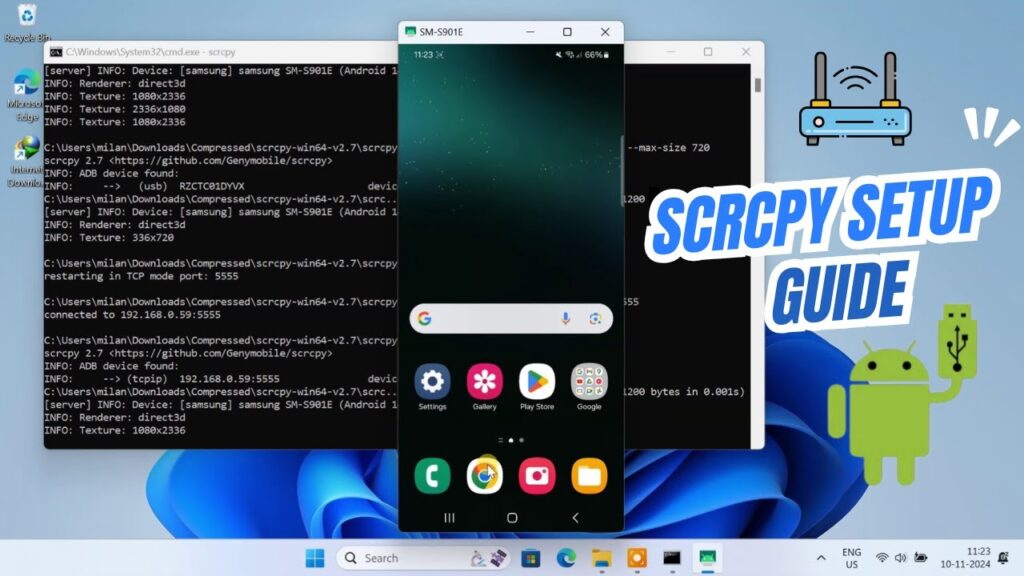
scrcpy is a powerful free tool that lets you mirror and control your Android phone directly from your Windows PC.
You can use your mouse and keyboard to control your phone, record screen, stream gameplay, and even connect wirelessly.
scrcpy is open-source, fast, lightweight, and does not require rooting your phone.
📥 Download scrcpy (Official)
System Requirements
- Windows 10 or Windows 11
- Android 5.0 or newer
- USB cable
- Wi-Fi network (for wireless mode)
Step 1 — Enable USB Debugging
On your Android phone:
- Open Settings
- Go to About Phone
- Tap Build Number 7 times
- Developer Options unlocks
Now:
- Open Developer Options
- Enable USB Debugging
Step 2 — Download & Extract scrcpy
Download scrcpy from GitHub.
Right-click the ZIP file → Extract All.
Open the extracted folder.
Step 3 — Connect Phone via USB
Plug your Android phone into the PC.
Set USB mode to File Transfer.
Allow USB debugging permission when prompted.
Step 4 — Launch scrcpy
Inside the scrcpy folder:
- Click address bar
- Type cmd
- Press Enter
Command Prompt opens in the folder.
Type:
scrcpy
Press Enter.
Your Android screen appears instantly on the PC.
You can control it with your mouse and keyboard.
Change Video Quality
You can control streaming quality.
Example command:
scrcpy --video-bit-rate 8M --max-size 1280
Options:
- Higher bitrate = better quality
- Lower bitrate = smoother performance
- Max-size controls resolution
Examples:
scrcpy --video-bit-rate 4M
scrcpy --max-size 1024
Wireless Connection (Wi-Fi Mode)
Both PC and phone must be on the same Wi-Fi network.
Keep USB connected during setup.
First run:
adb tcpip 5555
Find your phone IP address in Wi-Fi settings.
Then run:
adb connect your_ip:5555
Example:
adb connect 192.168.1.10:5555
Once connected, unplug USB.
Now launch scrcpy:
scrcpy
Your phone mirrors wirelessly.
What You Can Do with scrcpy
- Mirror phone screen
- Control apps with mouse
- Record gameplay
- Stream Android apps
- Take screenshots
- Wireless phone control
Performance Tips
- Use USB 3.0 cable
- Lower bitrate for smoothness
- Close background apps
- Use wired internet for streaming
Troubleshooting
- Device not detected → reinstall USB drivers
- No mirror → enable USB debugging
- Wireless fails → check IP address
- Laggy video → lower bitrate
FAQs
Does scrcpy require root?
No.
Is it safe?
Yes, open-source.
Works on macOS/Linux?
Yes.
Can I record screen?
Yes.
Final Result
You can now mirror and control your Android phone directly from your PC with scrcpy.
This is one of the fastest and safest Android mirroring tools available.
If this guide helped you, bookmark it and share it.